
Dispatch management
Dispatch software that stops making you retype the rate con
Upload the PDF and the load builds itself: pickup, delivery, rate, reference numbers, commodity, weight, and equipment type. Assign the truck, and the driver has it on his phone with one tap per status.
14-day free trial · $0 today
The problem
The typing is not the job, but it takes up most of the day
A rate con comes in. Somebody opens the PDF on one screen and a spreadsheet on the other and copies over the pickup, the delivery, the appointment times, the rate, and two reference numbers. Four minutes a load. Twenty loads a week is over an hour of somebody's time spent moving text from one rectangle to another.
Then the load has to get to the driver, so it goes out in a text. Then the broker calls for a status, so the dispatcher texts the driver, waits, and calls the broker back. Then the BOL comes back as a photo in the same thread as somebody's lunch order, and on Friday nobody can find it.
None of that is dispatching. Dispatching is deciding which truck takes which load and keeping it moving. The rest is data entry with extra steps.
AI-powered load creation
Drop the rate con. Check the fields. Save.
The parser reads the rate confirmation and fills the load: pickup location and time, delivery location and time, linehaul rate, broker reference numbers, commodity, weight, and equipment type. You see the filled-in load before anything saves, so you can correct whatever it read wrong and move on.
It works on the formats you actually get: broker-generated PDFs, scanned rate cons, and the ones that arrive as an email attachment nobody bothered to name.
Parse allowance by plan
20 Core · 60 Starter · 150 Pro · 500 Premium
Go over and you keep working, you just enter those loads yourself.
Or forward it and skip the upload
Every account gets a dedicated ingestion address. Forward the rate con from your inbox and the load is waiting for you when you open the app. Set up a forwarding rule from the broker's dispatch address and you stop touching it at all.
Assignment and planning
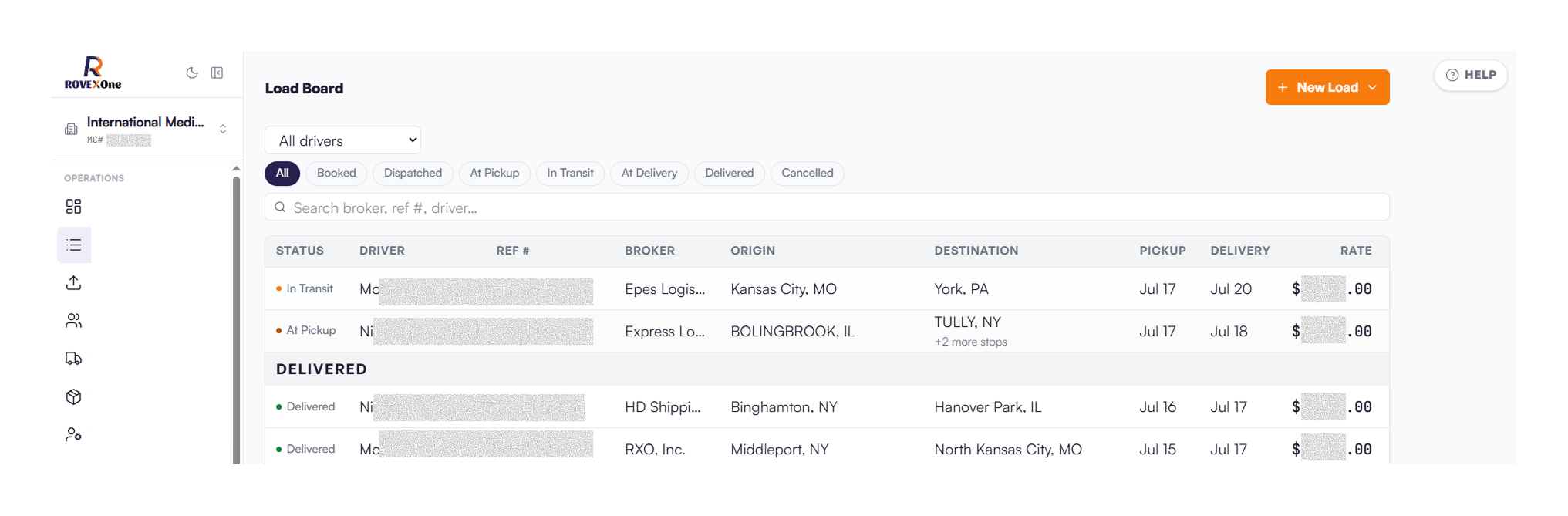
One board, every truck, every load
The load board shows what is created, what is dispatched, what is at pickup, what is en route, and what has delivered. Filter by period, open any load for the full detail.
Assignment
Pick the truck, pick the driver, pick the trailer. Equipment records carry VIN, plates, ownership type, status, and current assignment, so you are not dispatching a truck that is sitting in the shop.
Multi-stop loads
A three-drop run is one load with three stops, each carrying its own status, its own arrival timestamp, and its own reference number. When you bill it, the stops are already documented.
Owner-operators and company trucks together
Contracted owner-operators and your own equipment run on the same board. Pay configuration lives on the driver record, percentage or per-mile, so the difference shows up at settlement and not in your head.
Built for one truck too
Core covers 1 to 2 trucks. If you drive your own truck, you get the same load board, invoicing, expenses, financials, and IFTA as a larger fleet, and room to add a driver when you grow.
Visibility
Answer the broker without calling the driver
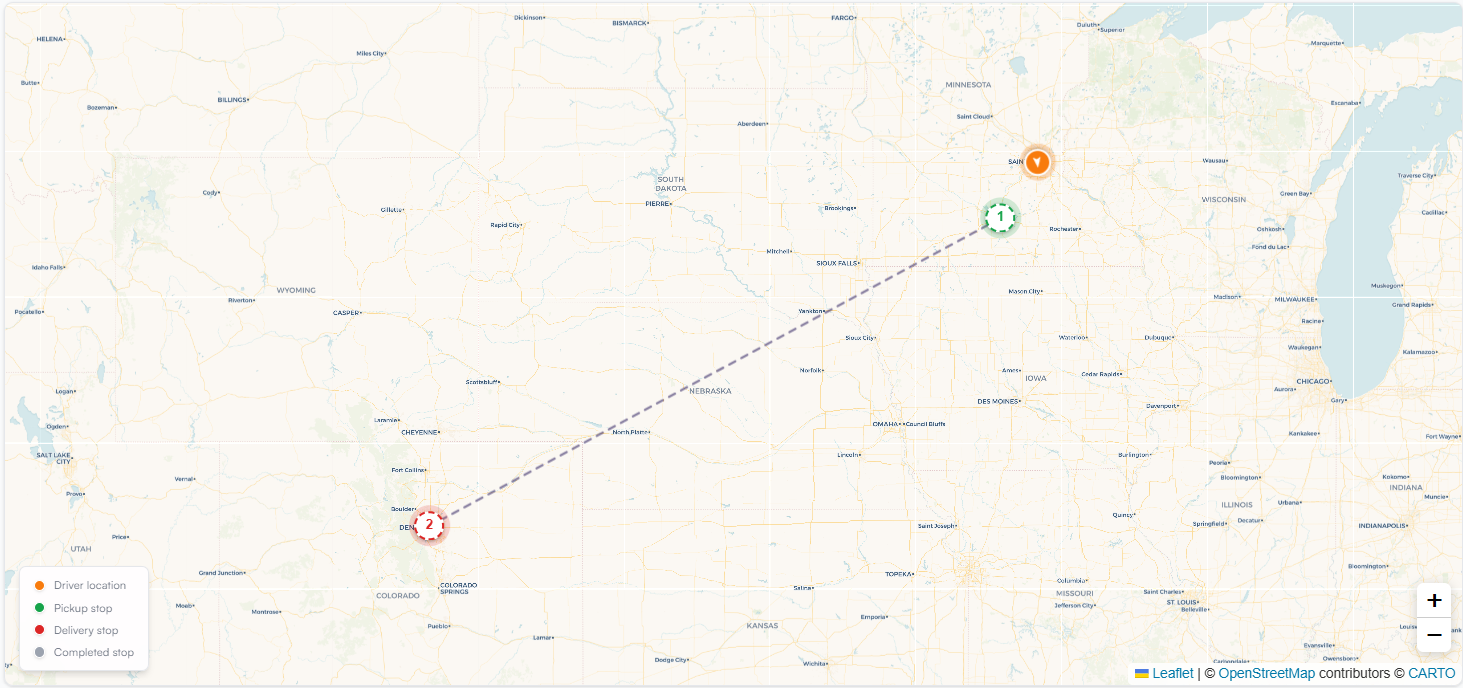
Live map (add-on)
Driver GPS positions and load progress on one screen, with the optional Live GPS Tracking add-on. You can see where the truck is before you pick up the phone.
Status from the driver’s phone
He taps At Pickup, En Route, Delivered as he goes. The status changes on your board the moment he taps it, with a timestamp on the stop.
Per-load detail
Every load carries its stops, its documents, its charges, its assigned equipment, and its history in one record. When a broker calls about a load from three weeks ago, you pull it up instead of scrolling a text thread.
Documents
The POD goes on the load, not in a group chat
The driver photographs the signed BOL from the app camera and it uploads straight onto the load record. No forwarding, no renaming, no CamScanner, no hunting for it on Friday.
That matters downstream more than it looks. When the load delivers, the invoice generates with the rate con, the BOL, and the POD already attached, so the packet is complete the first time it goes to the broker or to your factoring company. Incomplete packets are the most common reason a factoring submission bounces, and they are almost always missing a document that was sitting on somebody's phone.
Brokers
The AP email is already on file
Brokers and broker reps live in a contact book tied to the loads you have run with them. The AP email is on the broker record, so when the invoice is ready it knows where to go. You are not digging through an old rate con to find the billing address.
Migration
Your history comes with you
The historical load import wizard brings your past loads in through a review step so your revenue reports, your per-truck profitability, and your lane history do not start from zero on day one. Most carriers are dispatching the same afternoon they sign up.
What is included
Every dispatch feature, on every plan
Plans differ on capacity only: trucks, drivers, and dispatcher seats. Live GPS Tracking is an optional add-on on any plan.
- Load board with status tracking and period filters
- AI-powered load creation from a rate con PDF
- Email rate con ingestion to a dedicated address
- Multi-stop loads with per-stop status, timestamps, and reference numbers
- Driver invitation and pay configuration, percentage or per-mile
- Trucks, trailers, and truck owner records with service history
- Broker and broker rep contact book with AP email
- Historical load import wizard
- Owner-operators on Core, with room to add drivers
- Company switching for carriers running more than one authority
FAQ
Questions about dispatch
It is the system a carrier uses to take a load, assign it to a truck and a driver, track it to delivery, and hold the documents that come out of it. In a full TMS like RovexOne, dispatch is connected to invoicing, settlements, and compliance, so the load you dispatch is the same record you bill from and pay the driver from.
Get started today
Put your next rate con through it
Sign up, upload one PDF, and see what comes back. That is the whole evaluation.
14-day free trial · $0 today · Cancel anytime