
Accounting and driver pay
Invoice the day it delivers. Settle the driver without a calculator.
The invoice builds itself from the delivered load with detention and lumper broken out, and goes to the broker or to your factoring company with the rate con, BOL, and POD already merged in. Driver settlements calculate from load pay, deductions, and outstanding debt as the week runs.
14-day free trial · $0 today
The problem
The money is not slow because the freight is slow
A load delivers Tuesday. The POD sits on the driver's phone until he remembers to send it. The invoice gets built Thursday from a spreadsheet, missing the detention, because the detention was in a text message. It goes to the factor Friday and comes back Monday because the packet was short a document. Now it is a week and a half past delivery on a load that ran clean.
Meanwhile Friday night is settlements. Somebody opens the spreadsheet, adds up the loads for each driver, subtracts the advance, subtracts the ELD fee, remembers there was a reimbursement for a lumper, gets it wrong by eleven dollars, and the driver notices.
None of this is an accounting problem. It is a records problem. The information was all there. It was just in four places.
Invoicing
The invoice is already built when the load delivers
Every invoice comes off the load record, so the linehaul, the reference numbers, and the broker's billing contact are already correct. Add detention, lumper, TONU, and anything else as their own lines, which is what a broker's AP department wants to see anyway.
Four ways to send it
- Email straight to the broker’s AP address, which is already on the broker record
- Share a public link the broker can open without an account
- Download the PDF
- Print it
The supporting documents ride along. The rate con is on the load from creation, the BOL and POD are on it from the driver's phone, and the invoice pulls them into one packet.
How documents get onto the load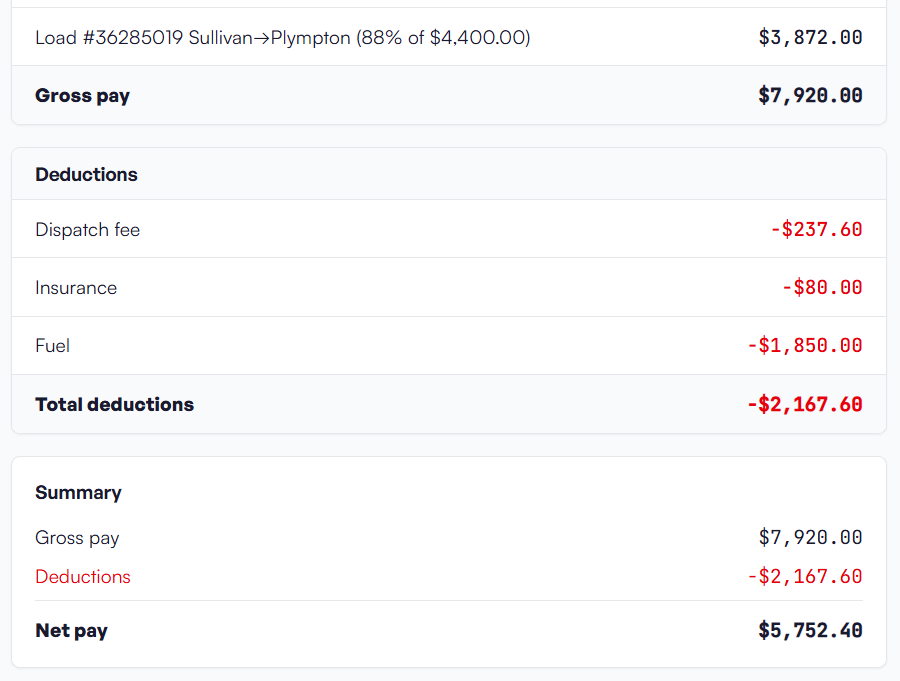
Factoring
Built for how factors actually take files
Submit invoices with the merged supporting documents to your factoring company by SFTP or by email. One at a time when you need it out fast, or in batches at the end of the day.
The reason submissions bounce is almost never the rate. It is a missing POD, a missing rate con, or a packet assembled in the wrong order. RovexOne builds the packet from the load, so what leaves is complete.
If your factor takes files a particular way, a specific folder structure over SFTP or a particular naming convention, tell us during onboarding and we will match it.
Settlements
Pay the driver right, on time, without Friday night math
Set the pay method on the driver record once: percentage of linehaul, or per mile. The statement builds from the loads that driver ran, minus deductions, plus reimbursements, minus whatever he still owes.
Deductions carry a balance
An advance, an ELD fee, an insurance chargeback, an escrow contribution: enter it once with a total, and it comes off each settlement until it is paid off. You are not tracking a running balance in your head or in a note on your phone.
Reimbursements and accessorials
Lumper paid out of pocket, a scale ticket, a stop charge. Log it the day it happens and it lands on the right statement.
Dispatchers settle too
Dispatcher pay runs on the same weekly cycle with the same statement engine, so commission-based dispatch is not a separate spreadsheet.
Statements the driver can read
Export the PDF or email it from the app. Drivers with the mobile portal pull up their own settlement history without calling the office, which cuts the Monday morning conversation about a check down to nothing.
Line-item transparency is the whole point. A driver who can see the load list, the deduction, and the balance remaining does not open a dispute. A driver who gets a single number does.
Expenses
Fuel, tolls, repairs, and the recurring stuff
Log expenses against a load, a truck, or the company. Attach the receipt photo. Set up recurring costs once so the insurance payment and the truck note stop being things you remember to enter.
TCS fuel card
Fuel card transactions pull in automatically over FTP, so the fuel side of your cost per mile is real data instead of an estimate. Fuel purchases feed the IFTA return too.
Reporting
Per load, per truck, per period
Financial dashboard
Revenue, expenses, and net profit by period. Not just what came in, what stayed.
Per-load profitability
Linehaul minus driver pay minus fuel minus tolls minus everything else attributed to that load. The load that looked good on the board and lost money on the road shows up here.
Per-truck reporting
Which truck is carrying the operation and which one is eating it. This is the number that tells you whether to buy the next truck or fix the one you have.
Revenue reports for truck owners
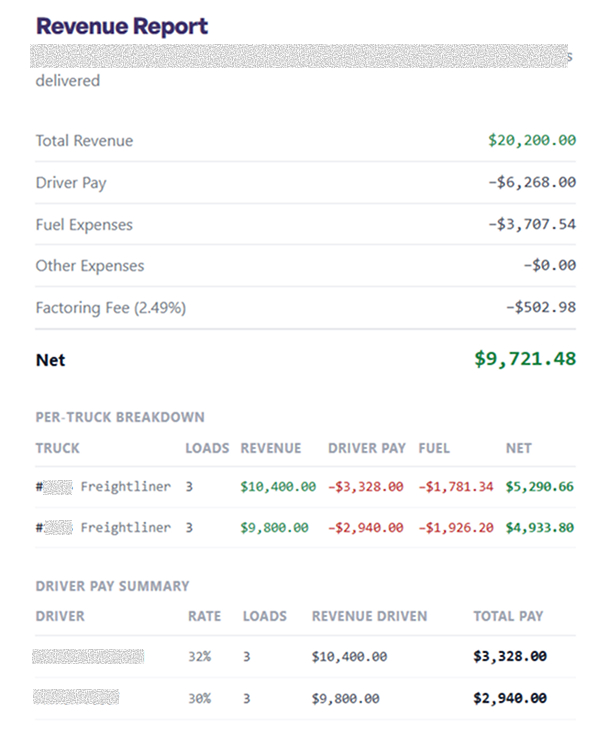
Build a report for a period, review the line items load by load, send it to the truck owner, and save it to history. If you run contracted owner-operator equipment, this is the conversation you have every month, and having it come out of the same system that ran the loads ends the argument before it starts.
Who sees what
Financials are gated by default
Three access levels: owner, full access, and operations. Operations users see dispatch and nothing else. Financials and compliance stay closed. You can bring a dispatcher on without handing over your margins.
What is included
Every finance feature, on every plan
- Invoice generation from the delivered load with detention, lumper, and other charges
- Email, public link, PDF, and print delivery
- Factoring submission by SFTP or email, individually or in batches, with merged documents
- Weekly settlements for drivers and dispatchers
- Percentage and per-mile pay configuration
- Debt tracking with automatic deduction until paid off
- Reimbursements and accessorial pay
- Settlement PDF export and email delivery
- Expenses with receipt uploads, per load and per truck
- Recurring expense scheduling
- TCS fuel card import over FTP
- Financial dashboard with revenue, expenses, and net profit by period
- Per-load and per-truck profitability
- Revenue reports for truck owners with saved history
- Quarterly IFTA reporting
- Access levels that gate financials
FAQ
Questions about getting paid
It handles the trucking side: invoicing, factoring submission, driver settlements, expenses, per-load and per-truck profitability, and IFTA. Most carriers still keep a general ledger for taxes and payroll filing. RovexOne is where the freight money is tracked, not where your CPA does your return.
Get started today
Run one week through it
Put a week of real loads in, generate the invoices, and build the settlements. You will know inside an hour whether it fits how you run.
14-day free trial · $0 today · Cancel anytime